How To Downgrade iOS 16 to iOS 15 Without Losing Data
Are you looking to downgrade iOS 16? You’ve reached the conclusion that there are too many bugs and lack in performance to justify an early access to its new features? Thankfully it’s possible to downgrade to iOS 15 without too much hassle.
iOS 16 Downgrade Requirements
Any iPhone or iPad running iOS 16 / iPadOS 16 can be downgraded to iOS 15, more exactly to the current iOS 15.5.
However, if you want to downgrade without losing data you need to own a full backup of your device on your computers or in your iCloud account.
Fact: If you followed our step-by-step guide when you updated to iOS 16 Beta you should own a full backup.
Important: If you also updated to watchOS 9 Beta you won’t be able to manually downgrade watchOS 9 to 8. This will make your watch unusable, until you get back to iOS 16 or ship it to an Apple shop and ask for a professional downgrade.
How To Downgrade iOS 16 to 15
You can also downgrade without having a backup, however this will cause you to lose data. These are the steps:
Disable Find My
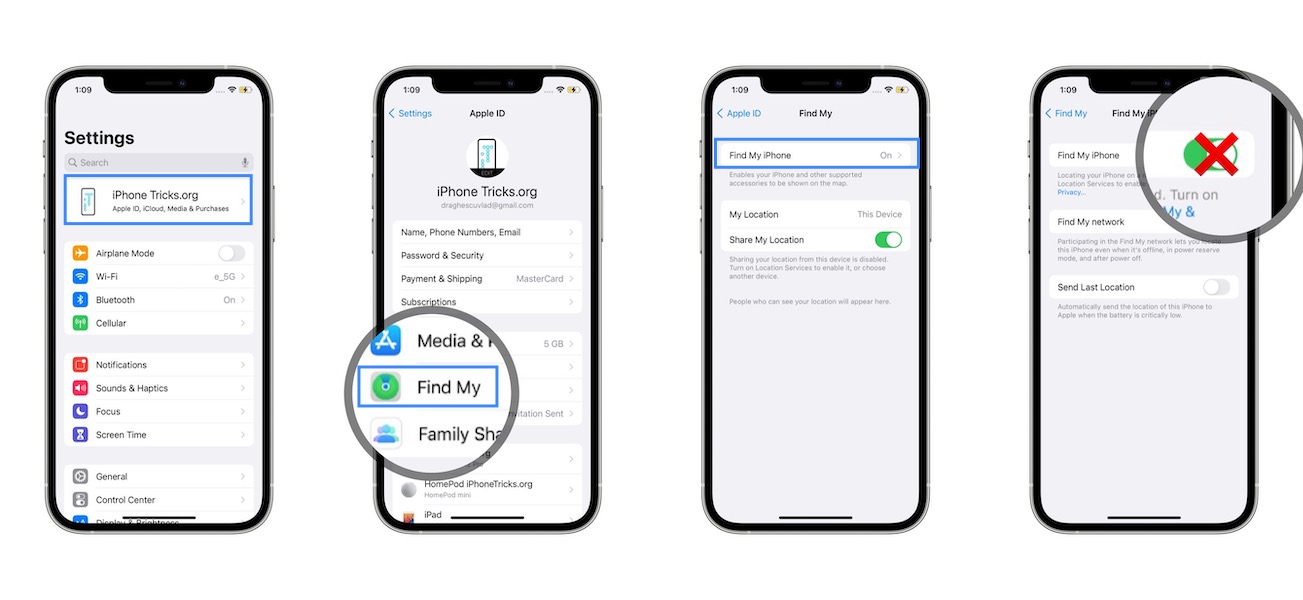
This is done in Settings on both iPhone and iPad:
1. Go for
Apple ID -> Find My -> Find My iPhone -> Turn Off
Connect iPhone To Computer
- 2. Open Finder on Mac, or iTunes on a Windows computer.
- 3. Connect iPhone or iPad to computer with the help of the Lightning cable.
- 4. Trust iPhone on Mac and vice-versa if requested.
Bring Device In Recovery Mode
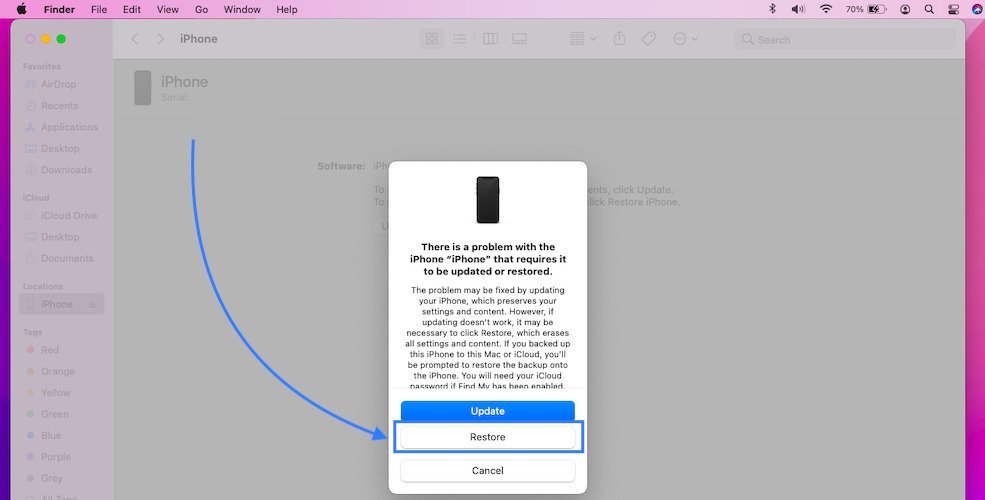
- 5. There are multiple ways to do it depending on your iPhone and iPad model. The most common is:
Volume Up -> Volume Down -> Hold Side Button pressed until Recovery Mode screen is displayed.
Fact: These combo works from the iPhone 8 up to the iPhone 13 Pro lineup. Older iPhone models are not compatible with iOS 16!
Tip: If you own an iPad with a Home Button you can bring it into Recovery Mode by pressing and holding the Sleep/Wake button + Volume Down button at the same time.
Install iOS 15 / iPadOS 15
- 6. Click Restore to erase your device and install the latest iOS 15.5 / iPadOS 15.5 public release. Click Restore and Update to confirm your selection.
Tip: Be patient until the software restore is verified with Apple’s servers.
- 7. Use the Restore from backup option to bring back your data and settings from the backup that you performed before the iOS 16 Beta update!
How To Bring iPhone In Recovery Mode
iPhone 8 – iPhone 13 Pro Max: Click and quickly release Volume Up, followed by Volume Down and press & hold the Side Button until the Recovery Mode screen is displayed on your device.
Downgrade iOS 16 Without Computer
Unfortunately, you can’t downgrade iOS 16 / iPadOS 16 without connecting your device to a Mac or Windows computer.
You need the Finder or iTunes software for the process to work.
Have you managed to downgrade iOS 16 to 15 without losing data? Which where the reasons that made you downgrade? Share your feedback in the comments!
-
 -6%
Apple - MacBook Pro 14-Inches M1 Pro, 16-core Neural Engine, Liquid Retina XDR display - Latest ModelAs low as $1,969.85 Regular Price $2,096.04
-6%
Apple - MacBook Pro 14-Inches M1 Pro, 16-core Neural Engine, Liquid Retina XDR display - Latest ModelAs low as $1,969.85 Regular Price $2,096.04 -
-36%
Apple - MacBook Pro 16-inches M1 Pro / M1 Max chip with 10‑core CPU, 1TB SSD Storage¹, Liquid Retina XDR display - Latest ModelAs low as $1,899.00 Regular Price $2,963.00
-
-49%
Apple MacBook Pro 16-inches Intel Core i9 2.4GHz 32GB RAM 2TB Storage 5500M/8G- 2019-2020 ZN2 - Space Gray RefurbishedSpecial Price $2,521.73 Regular Price $4,930.38
-
-2%
Apple - MacBook Pro 13-inch M1 Chip 8-Core RAM 8GB SSD 512GB Retina display with True Tone Touch Bar & ID - CN Version - Space GraySpecial Price $1,577.09 Regular Price $1,609.59
-
-33%
NEW Apple MacBook Pro 13-Inch Intel Core i7 2.3Ghz 10th Generation 32GB RAM SSD 4TB Custom Edition 2020As low as $2,900.00 Regular Price $4,350.00
-
-13%
Apple - MacBook Pro 13-Inch M1 Chip RAM 8G SSD1TB with Touch Bar - Customized Version 2021As low as $1,647.38 Regular Price $1,900.85
-
-13%
Apple - MacBook Pro 13-Inch M1 Chip RAM 16G SSD1TB with Touch Bar - Customized Version 2021As low as $1,837.49 Regular Price $2,122.64
-
-21%
Apple - MacBook Pro 13-Inch M1 8-Core RAM8GB SSD256GB US Version 2021 Official RefurbishedAs low as $1,250.21 Regular Price $1,583.09
-
-47%
Apple - MacBook Pro 13-Inch M1 8-Core RAM8GB SSD512GB US Version 2021 Official RefurbishedAs low as $1,080.48 Regular Price $2,057.48