Nintendo Switch OLED vs. Steam Deck: Which One Is Better?

Choosing between the Nintendo Switch OLED and the Steam Deck depends on your gaming preferences, what you want to use the device for, and your priorities in terms of game library, performance, portability, and ecosystem. Both devices have unique features and serve different types of gaming audiences. Let’s break down the key differences to help you decide which one is right for you.
1. Gaming Library
Nintendo Switch OLED:
- Exclusive Games: The biggest advantage of the Nintendo Switch OLED is its exclusive game library, which includes franchises like The Legend of Zelda, Super Mario, Animal Crossing, Splatoon, Metroid, and Mario Kart. These games are only available on Nintendo’s platform, so if you’re a fan of these iconic titles, the Switch is the go-to device.
- Family-Friendly Games: The Switch has a family-friendly library and is a great choice for gamers of all ages. Many of its top games are suitable for younger audiences or casual gamers, though there are also games for more hardcore players.
- Third-Party Support: While the Switch has some third-party games, it’s not as extensive or high-performance as the Steam Deck in terms of AAA titles. Many big games, especially graphically demanding ones, may either be unavailable or have scaled-back versions.
Steam Deck:
- Massive Game Library: The Steam Deck connects directly to Steam, the world’s largest digital game store, which means you can play virtually all PC games available on Steam, including AAA titles, indie games, and everything in between. You also have access to games from other storefronts (like Epic Games or GOG) by installing additional software.
- Performance for PC Games: The Steam Deck is more powerful in terms of running modern PC games at higher settings than the Switch, especially for graphically demanding games like Cyberpunk 2077, Red Dead Redemption 2, and The Witcher 3 (albeit with some tweaks to settings for optimal performance).
Winner (Game Library):
- Nintendo Switch OLED wins if you’re looking for Nintendo exclusives or family-friendly games.
- Steam Deck wins if you’re looking for a huge variety of games, especially PC titles and AAA games.
2. Performance and Hardware
Nintendo Switch OLED:
- Display: The OLED model of the Nintendo Switch offers a 7-inch OLED screen, which is a significant upgrade over the original Switch’s LCD. The OLED screen provides vivid colors and better contrast, especially in handheld mode.
- Performance: The Switch OLED features the same internal hardware as the original Switch, which is powered by an NVIDIA Tegra X1 chip. It offers solid performance for its age but may struggle with more graphically demanding games or higher frame rates in comparison to newer hardware.
- Battery Life: The Nintendo Switch OLED provides up to 9 hours of battery life in handheld mode, depending on the game being played.
Steam Deck:
- Display: The Steam Deck features a 7-inch touchscreen with a 720p resolution, which is slightly lower in pixel density than the OLED model but still provides a good experience for most games. Its refresh rate is capped at 60Hz.
- Performance: The Steam Deck is significantly more powerful than the Switch, with a custom AMD APU combining a Zen 2 CPU and RDNA 2 GPU. It is capable of running modern PC games at decent settings, and you can adjust the performance for better battery life or higher frame rates.
- Battery Life: The Steam Deck offers around 2-8 hours of battery life depending on the game and performance settings. For demanding titles, you may get closer to the 2-hour mark, but for lighter games, you could get up to 8 hours.
Winner (Performance):
- Steam Deck is the clear winner in terms of performance, with much more powerful hardware capable of running modern PC games.
- Nintendo Switch OLED is great for casual gaming and runs Nintendo games smoothly but is limited in terms of graphical performance compared to the Steam Deck.
3. Portability and Design
Nintendo Switch OLED:
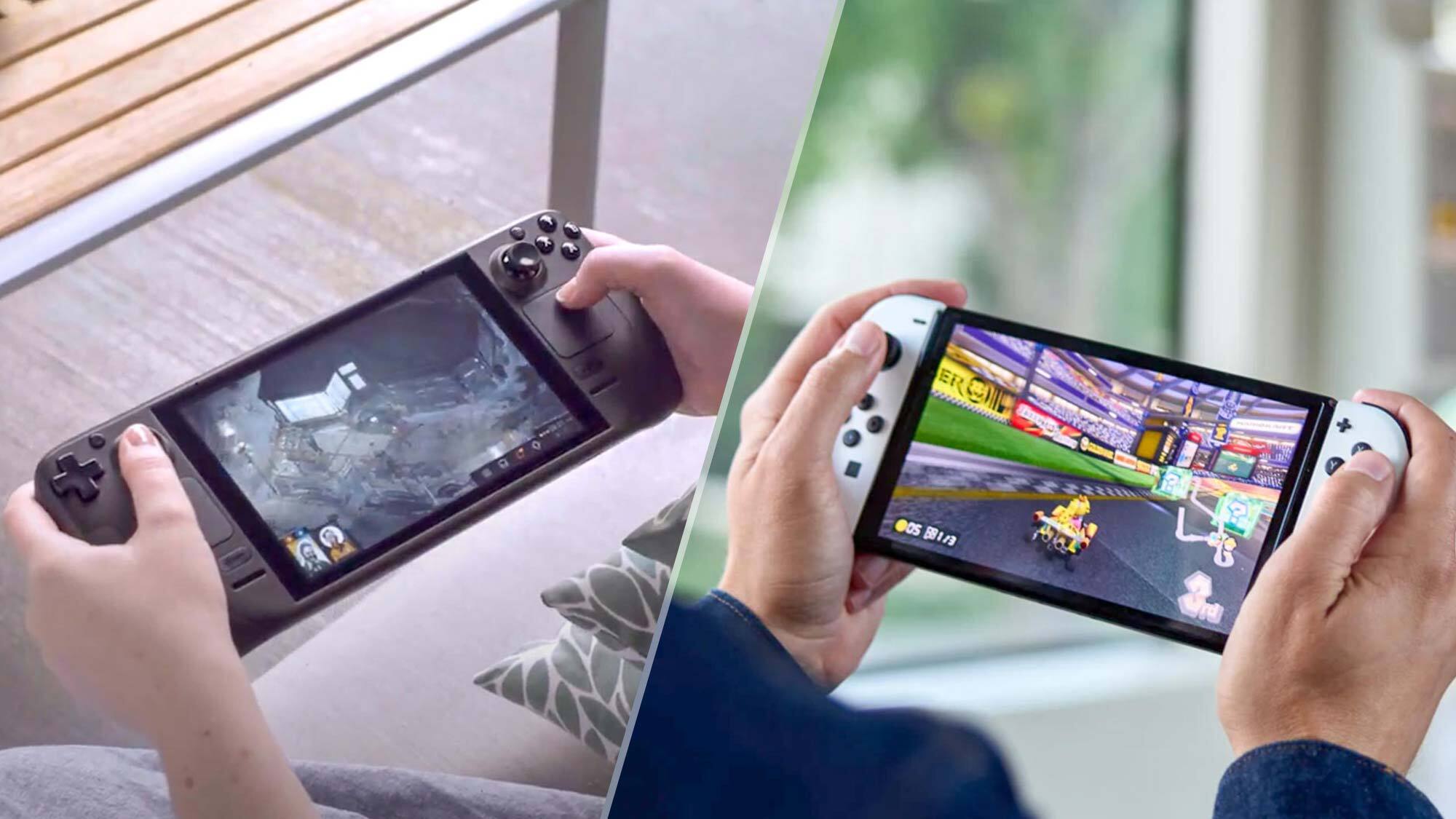
- Portability: The Nintendo Switch OLED is lightweight and compact. It's easy to take on the go, and it can be used in handheld mode, tabletop mode (with the built-in kickstand), or docked to a TV for a home console experience.
- Design: The Switch OLED has a sleek design with an improved kickstand that is more adjustable, allowing for more comfortable tabletop play. The Joy-Con controllers are detachable, so you can play in multiplayer mode on the go, making it a versatile device for social gaming.
Steam Deck:
- Portability: The Steam Deck is noticeably larger and heavier than the Switch OLED. It’s still portable, but it’s not as easy to carry around due to its bulkier size. It has a built-in controller layout that might feel less versatile compared to the detachable Joy-Con controllers.
- Design: The Steam Deck has customized controls (analog thumbsticks, trackpads, and thumb buttons) that provide flexibility for both traditional gaming and PC-style inputs. The size and design are more akin to a larger handheld gaming PC, making it less compact than the Switch OLED.
Winner (Portability and Design):
- Nintendo Switch OLED wins for being more portable, compact, and versatile with detachable controllers.
- Steam Deck is a bit bulky and heavier, but it provides more traditional console-like controls and flexibility for PC gaming.
4. Price
Nintendo Switch OLED:
- Price: The Nintendo Switch OLED is priced at $349.99 (in the US). This is higher than the standard Nintendo Switch, but it provides a better screen and some minor upgrades to the kickstand and audio.
Steam Deck:
Price: The Steam Deck has several price tiers depending on the storage capacity:
- 64GB eMMC model: $399
- 256GB NVMe model: $529
- 512GB NVMe model: $649 The higher storage models come with faster loading speeds and more space for games.
Winner (Price):
- Nintendo Switch OLED is more affordable at $349.99.
- Steam Deck can be more expensive, especially the higher storage versions, but it provides more powerful hardware and access to the Steam library.

5. Software and Ecosystem
Nintendo Switch OLED:
- The Nintendo Switch operates on a proprietary OS with a simple, easy-to-use interface. It is heavily tied into Nintendo's ecosystem with access to Nintendo eShop, Nintendo Switch Online for multiplayer, and cloud saves (for most games).
- You can also play retro games if you subscribe to the Nintendo Switch Online + Expansion Pack.
Steam Deck:
- The Steam Deck runs a custom version of SteamOS, which is based on Linux but allows you to install Windows if you want access to the broader PC ecosystem. You can install third-party launchers like Epic Games Store or GOG Galaxy, allowing for a highly flexible gaming experience.
- Steam Deck also has access to Steam’s extensive library of games, and you can use it to browse the internet, install software, or even run emulators.
Winner (Software and Ecosystem):
- Nintendo Switch OLED wins for ease of use and family-friendly features, with its proprietary Nintendo ecosystem focused on gaming.
- Steam Deck wins for flexibility and access to the massive Steam library and the ability to install third-party apps, providing a more open ecosystem.
Final Verdict: Which One is Better for You?
Choose the Nintendo Switch OLED if:
- You want to play Nintendo exclusive games (like Zelda, Super Mario, and Animal Crossing).
- You prefer a more portable, compact device with versatile multiplayer options.
- You’re looking for an affordable handheld console with great performance for its price.
Choose the Steam Deck if:
- You want a more powerful device capable of running modern PC games from Steam.
- You like the idea of a portable PC that lets you install software, use other stores, and customize your experience.
- You’re looking for more flexibility in your game library and are willing to accept a bulkier, heavier device.
In short, Nintendo Switch OLED is perfect for those who prioritize Nintendo’s exclusive content and a more user-friendly experience, while the Steam Deck is better for hardcore gamers who want the freedom of a full PC gaming experience on the go.


- Nintendo Switch OLED vs Steam Deck
- Switch OLED vs Steam Deck comparison
- best handheld gaming consoles
- Steam Deck review
- Nintendo Switch OLED review
- Steam Deck price
- Switch OLED features
- gaming console comparison
- Steam Deck vs Switch
- Steam Deck performance
- portable gaming devices
- Nintendo Switch OLED features
- Steam Deck vs Switch pros and cons