NVIDIA DGX Spark vs Apple Mac mini M4 Pro: Which Local AI Machine Wins in 2026?
- Two Tiny Boxes, Two Very Different AI Worlds
- Hardware Specifications: Side-by-Side
- AI Performance: Inference, Throughput, and Fine-Tuning
- Software Ecosystem: CUDA vs Metal
- Real-World Experience: Noise, Heat, and Scalability
- The Combo Experiment: DGX Spark + Mac Studio
- Pricing and Value Analysis
- Verdict: Which One Should You Buy?
- Key Takeaways
Two Tiny Boxes, Two Very Different AI Worlds
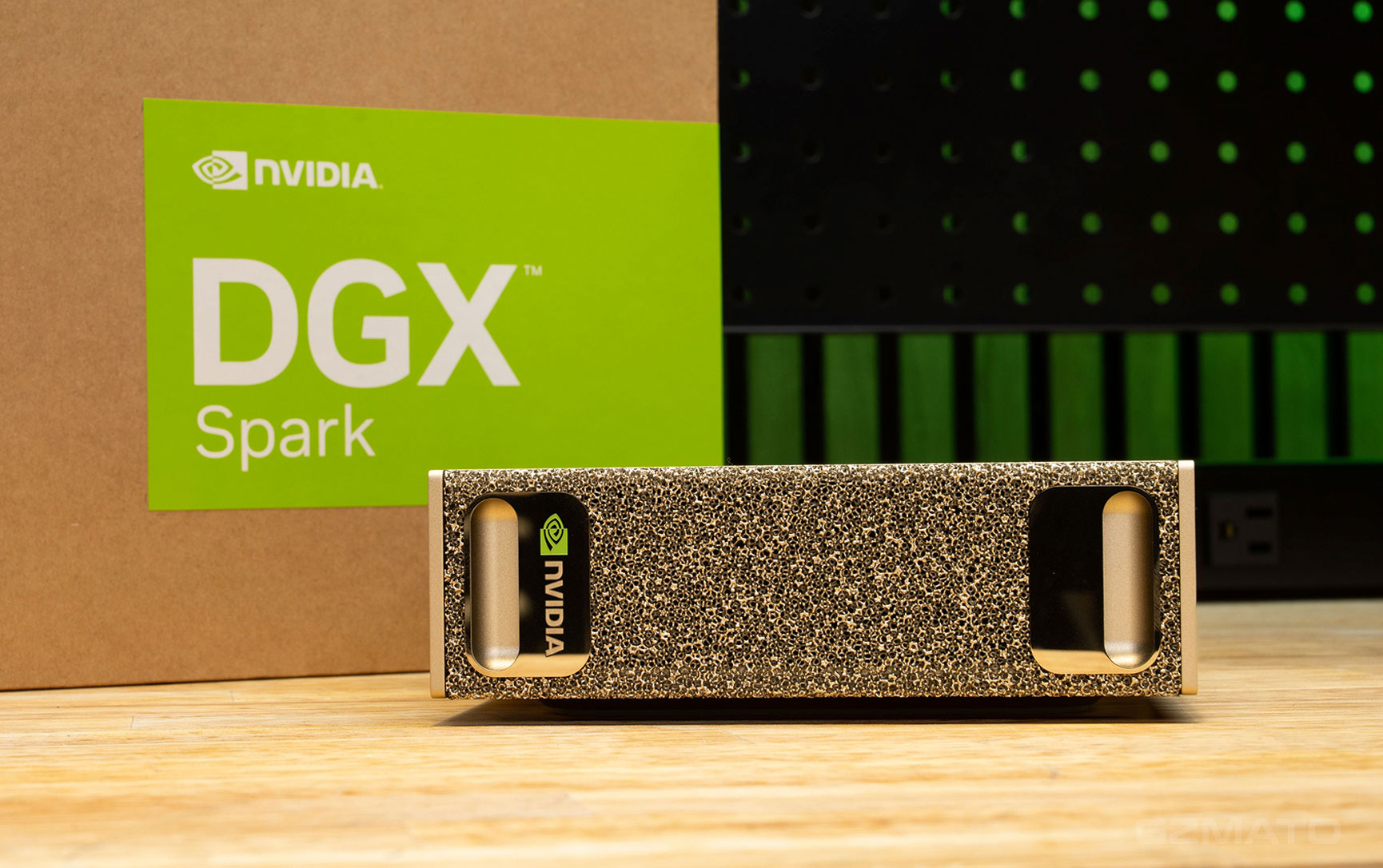
On your desk, both the NVIDIA DGX Spark and Apple Mac mini M4 Pro take up almost no space. But under the hood, they represent two fundamentally different approaches to local AI computing. One is a purpose-built AI appliance with CUDA and 128GB of unified memory. The other is a general-purpose desktop that happens to be surprisingly good at running models, as long as they fit within 64GB.
They are not direct competitors. The DGX Spark is an AI developer's specialized tool. The Mac mini M4 Pro is an excellent all-around computer that can also run AI models. Choosing between them means understanding what kind of AI work you actually do.
Hardware Specifications: Side-by-Side
Both systems are small, quiet, and energy-efficient. But their internal architectures reflect completely different design philosophies.
| Specification | NVIDIA DGX Spark (GB10) | Apple Mac mini M4 Pro |
|---|---|---|
| Chip | NVIDIA GB10 Grace Blackwell Superchip | Apple M4 Pro |
| CPU | 20-core Arm | 12-core or 14-core |
| GPU | Blackwell, 6,144 CUDA cores, 5th-gen Tensor Cores | 16-core or 20-core integrated GPU |
| AI Compute | Up to 1 Petaflop (FP4 with sparsity) | ~38 TOPS (Neural Engine) |
| Unified Memory | 128 GB LPDDR5X | 24 GB or 64 GB LPDDR5X |
| Memory Bandwidth | 273 GB/s | 273 GB/s |
| Storage | Up to 4 TB NVMe M.2 | 512 GB to 8 TB SSD |
| Networking | ConnectX-7 200 GbE, 1× 10GbE, Wi-Fi 7 | Gigabit Ethernet, optional 10GbE, Wi-Fi 6E |
| Power Consumption | 240W (GB10 TDP ~140W) | ~40-60W |
| Noise Level | Audible under load, but office-compatible | Virtually silent |
| Operating System | DGX OS (Ubuntu-based) or Windows | macOS |
| Price | $4,699 (MSRP as of April 2026) | $1,299 - $2,199 |
The most striking similarity: both systems have exactly the same memory bandwidth of 273 GB/s. This is the fundamental limit for token generation, and it explains much of their comparative performance.
The most important difference: memory capacity. DGX Spark offers 128GB; Mac mini maxes out at 64GB. That 64GB gap determines which models can run at all.
AI Performance: Inference, Throughput, and Fine-Tuning
The performance relationship between these two systems reverses depending on workload. One is not universally faster—they have different strengths.
Single-User Inference (Latency)
For a single user generating responses, the Mac mini M4 Pro often feels faster. Independent benchmarks show that for small models like Llama 3.1 8B, the Mac mini achieves approximately 52 tokens per second (q4_K_M) compared to DGX Spark's ~38 tokens per second on similar workloads.
Both systems share identical memory bandwidth (273 GB/s), but Apple's MLX framework is highly optimized for Apple Silicon, and macOS manages memory efficiently for single-user workloads. The DGX Spark's true advantage appears only when you scale up.
Multi-User and Batch Throughput
When processing multiple requests simultaneously, the DGX Spark pulls ahead. With 128GB of unified memory, it can handle much larger batch sizes, dramatically increasing overall throughput.
| Model | DGX Spark Throughput | Mac Mini (Single User) |
|---|---|---|
| Llama 3.1 8B (FP4, batch 128) | ~924 tokens/sec | Not achievable (memory limits batch size) |
| Qwen3 Coder 30B (FP8, batch 64) | ~483 tokens/sec | Not achievable |
| GPT-OSS 20B (single user, MXFP4) | ~58 tokens/sec | ~55 tokens/sec (similar, bandwidth-bound) |
The pattern is clear: for a single user, the Mac mini is competitive. For any scenario involving multiple users, batch inference, or server-like workloads, the DGX Spark's memory capacity and CUDA optimizations give it a decisive advantage.
Model Capacity: What Can Actually Run?
This is where the 128GB vs 64GB difference becomes decisive.
| Model | DGX Spark (128GB) | Mac mini M4 Pro (64GB) |
|---|---|---|
| Llama 3.1 70B (4-bit) | Runs comfortably (~35-40GB) | Runs, but tight on memory |
| Llama 3.1 70B (8-bit) | Runs (~70GB) | Cannot run (exceeds 64GB) |
| GPT-OSS 120B (4-bit) | Runs (~60GB) | Cannot run |
| DeepSeek-V3 671B (4-bit MoE) | Cannot run (needs ~340GB) | Cannot run |
The 64GB Mac mini can run most popular 70B models in 4-bit quantization. The DGX Spark can run the same models in higher precision (8-bit) and can handle 120B models that simply do not fit on the Mac mini.
Fine-Tuning and Training
For small-scale fine-tuning, the DGX Spark has clear advantages.
- Full fine-tuning of Qwen3 8B with 8-bit Adam requires ~70GB, fitting comfortably in DGX Spark's 128GB but exceeding the Mac mini's 64GB ceiling.
- Sebastian Raschka's benchmarks show the DGX Spark significantly outperforming the Mac Mini M4 Pro on small-model inference, fine-tuning, and preference tuning.
- Limitation: The DGX Spark cannot replace A100 or H100 GPUs for large-scale training. It is best understood as a development and prototyping system—an "in-between" machine for smaller runs and testing models in CUDA before moving to cloud GPUs.
Software Ecosystem: CUDA vs Metal
The software story is as important as the hardware. Both systems have mature ecosystems, but they serve different workflows.
- CUDA native: PyTorch, TensorFlow, vLLM, TensorRT-LLM, and every major AI framework work out of the box.
- DGX OS: Ubuntu-based operating system with the full NVIDIA software stack pre-configured.
- Container ecosystem: Run NVIDIA's production containers directly. What runs on a DGX Spark also runs on an H100 cluster.
- llama.cpp support: The DGX Spark shows strong prompt processing: 1,723 tokens/sec for GPT-OSS 120B and 3,621 tokens/sec for GPT-OSS 20B.
- MLX framework: Apple's optimized array framework for Apple Silicon, highly efficient for transformers and LLMs.
- Ollama and LM Studio: Work seamlessly on Mac, with excellent performance per watt.
- llama.cpp: Well-supported and highly optimized for Apple Silicon's unified memory architecture.
- The "CUDA gap" is real: Many AI libraries and tutorials still assume a CUDA environment.
The software choice matters. If your workflow depends on CUDA-specific libraries or production containers, the DGX Spark is the only option. If you work primarily with Ollama, MLX, or llama.cpp, the Mac mini is a compelling, lower-cost alternative.
Real-World Experience: Noise, Heat, and Scalability
After extended use, several practical differences emerge.
| Aspect | DGX Spark | Mac mini M4 Pro |
|---|---|---|
| Noise Level | Audible under load but office-compatible | Virtually silent at all times |
| Heat Output | Runs warm but within spec | Minimal heat, even under load |
| Form Factor | 5.9" × 5.9" × 1.98" (1.13L) | Similar size, slightly taller |
| Setup Complexity | Pre-configured software stack reduces configuration friction | Plug-and-play, zero configuration required |
| Scalability | ConnectX-7 200GbE supports multi-unit clustering | No native clustering; limited to single-unit inference |
The DGX Spark runs hotter and has audible fan noise under load, but it is still office-compatible. The Mac mini remains almost completely silent, a meaningful advantage for quiet office environments.
One underappreciated feature: the DGX Spark's ConnectX-7 networking enables multiple units to be clustered. Two DGX Sparks connected via the dedicated 200GbE link can double both processing speed and effective memory capacity, enabling local inference on models up to 200GB in size. The Mac mini has no comparable scaling capability.
The Combo Experiment: DGX Spark + Mac Studio
One of the most interesting developments in local AI hardware is the possibility of hybrid inference: using the DGX Spark for prompt processing (prefill) and a Mac for token generation (decode).
In benchmark testing with Llama 3.1 8B:
| Metric | DGX Spark Alone | Mac Studio M3 Ultra Alone | Disaggregated (Spark + Studio) |
|---|---|---|---|
| Prefill 4K (tok/s) | 1,585 | 1,420 | 1,584 |
| Decode (tok/s) | 14 | 106 | 84 |
The disaggregated setup achieved 84 tokens/sec for decode—six times faster than the Spark alone, while retaining the Spark's superior prefill speed. A 50Gb network link added only ~18ms of overhead, nearly negligible.
However, the honest assessment from the experimenter is direct: "DGX Spark and Mac Studio are not cheap. If I'm spending this kind of money on new desktop equipment, I would rather buy an RTX Pro 6000 and build a system around it." A single RTX Pro 6000 (Blackwell workstation GPU) offers roughly six times the memory bandwidth and 3.5 times the compute of the DGX Spark, likely outperforming either machine individually or in combination.
Pricing and Value Analysis
The price difference between these systems is substantial and must be considered in context.
The cost per gigabyte of memory is surprisingly similar between the 64GB Mac mini ($34/GB) and the DGX Spark ($37/GB). The Mac mini's lower entry price reflects its smaller baseline configuration, not a dramatic memory cost advantage.
The base Mac mini M4 Pro at $1,299 is an excellent entry point for local AI experimentation. But for serious AI development requiring larger models or CUDA compatibility, the DGX Spark's higher price reflects genuine capability differences, not just brand markup.
Verdict: Which One Should You Buy?
Here is how to choose based on your actual use case:
- You are just starting with local AI. The $1,299 entry price is low-risk, and the 24GB model is sufficient for experimentation.
- You need a general-purpose desktop that also runs models. The Mac mini excels at everyday computing tasks while handling AI workloads capably.
- You work within 64GB memory. Most 70B models in 4-bit quantization fit comfortably.
- Silence and power efficiency matter. The Mac mini is virtually silent and sips power.
- Your AI workflow uses Ollama, LM Studio, or MLX. These are well-optimized for Apple Silicon.
- You need 128GB of unified memory. If 70B models in 8-bit or 120B models are essential, the Mac mini cannot run them at all.
- CUDA is non-negotiable. If your workflow depends on NVIDIA's software stack, there is no alternative.
- You are building a local inference server. The DGX Spark's batch throughput and 200GbE clustering capabilities make it suitable for team use.
- Your workload is compute-bound (prompt processing, fine-tuning). The DGX Spark excels at these tasks.
- You want a development environment that matches cloud production. What runs on a DGX Spark also runs on an H100 cluster.
If you fall in between—you need CUDA but cannot justify $4,699—building a traditional workstation around an RTX 5090 (32GB VRAM) or RTX Pro 6000 is a viable alternative. This will cost approximately $3,000-$5,000 depending on configuration and offers much higher memory bandwidth than either the DGX Spark or Mac mini.
Key Takeaways
- DGX Spark offers 128GB unified memory — runs 70B models in 8-bit and 120B models that the 64GB Mac mini cannot handle.
- Both systems share identical 273 GB/s memory bandwidth — token generation speeds are more similar than raw compute numbers suggest.
- CUDA ecosystem is the DGX Spark's killer feature — if your workflow depends on NVIDIA's software stack, there is no Mac alternative.
- Mac mini M4 Pro is exceptionally quiet and power-efficient — runs at 40-60W with virtually no fan noise, versus the DGX Spark's audible 140W operation.
- Batch throughput favors the DGX Spark — 128GB memory enables much larger batch sizes, achieving ~924 tokens/sec on Llama 3.1 8B FP4.
- Single-user latency is similar — both systems are bandwidth-constrained; the Mac mini sometimes feels faster for single-stream inference.
- DGX Spark supports clustering via 200GbE — two units can be combined to double memory and processing, enabling local 200B+ model inference.
- Hybrid DGX Spark + Mac setups are experimentally possible — disaggregated inference can achieve 84 tokens/sec decode on a Mac Studio paired with a DGX Spark for prefill.
- Cost per GB of memory is similar — ~$34/GB for Mac mini 64GB, ~$37/GB for DGX Spark 128GB.
- Your workflow, not the benchmark, should drive the decision — different workloads favor different architectures.
Sources & Methodology (as of June 2, 2026):
- StorageReview — DGX Spark full review and benchmarks
- Sebastian Raschka, PhD — PyTorch development and fine-tuning benchmarks
- Jeff Geerling / 電腦王阿達 — Disaggregated inference experiment
- MindStudio — Mac mini vs RTX 5090 vs DGX Spark comparison
- 라온피플 — AI workstation selection guide and batch throughput analysis
- AIMultiple — DGX Spark benchmarks and alternatives
- Check-mac — Mac mini M4 Pro specifications
- Ars Technica forums — Relative performance in Apple Silicon era
Gear Up for Your AI Workstation with Gzmato
Fast Chargers | USB-C Cables | Screen Protectors | Wireless Chargers | Power Banks | Travel Adapters
Special Offer: Use code TECH2026 for discount on your first order!
- DGX Spark
- Mac mini M4 Pro
- local AI hardware
- NVIDIA vs Apple
- CUDA vs Metal
- 128GB unified memory
- LLM inference
- fine-tuning