OpenClaw vs Manus: Local vs Cloud AI Agents — Which One Should You Trust?
- OpenClaw vs Manus: Two Philosophies of AI Agents
- What Is OpenClaw? The Open-Source AI Agent
- The OpenClaw Security Scandal: 200,000 Exposed Agents
- What Is Manus? The 'Plug-and-Play' AI Assistant
- Side-by-Side Comparison
- The Security Red Line: What AI Agents Should NEVER Do
- How to Deploy OpenClaw Safely
- A Note on Cloud-Based AI Agents
- Key Takeaways
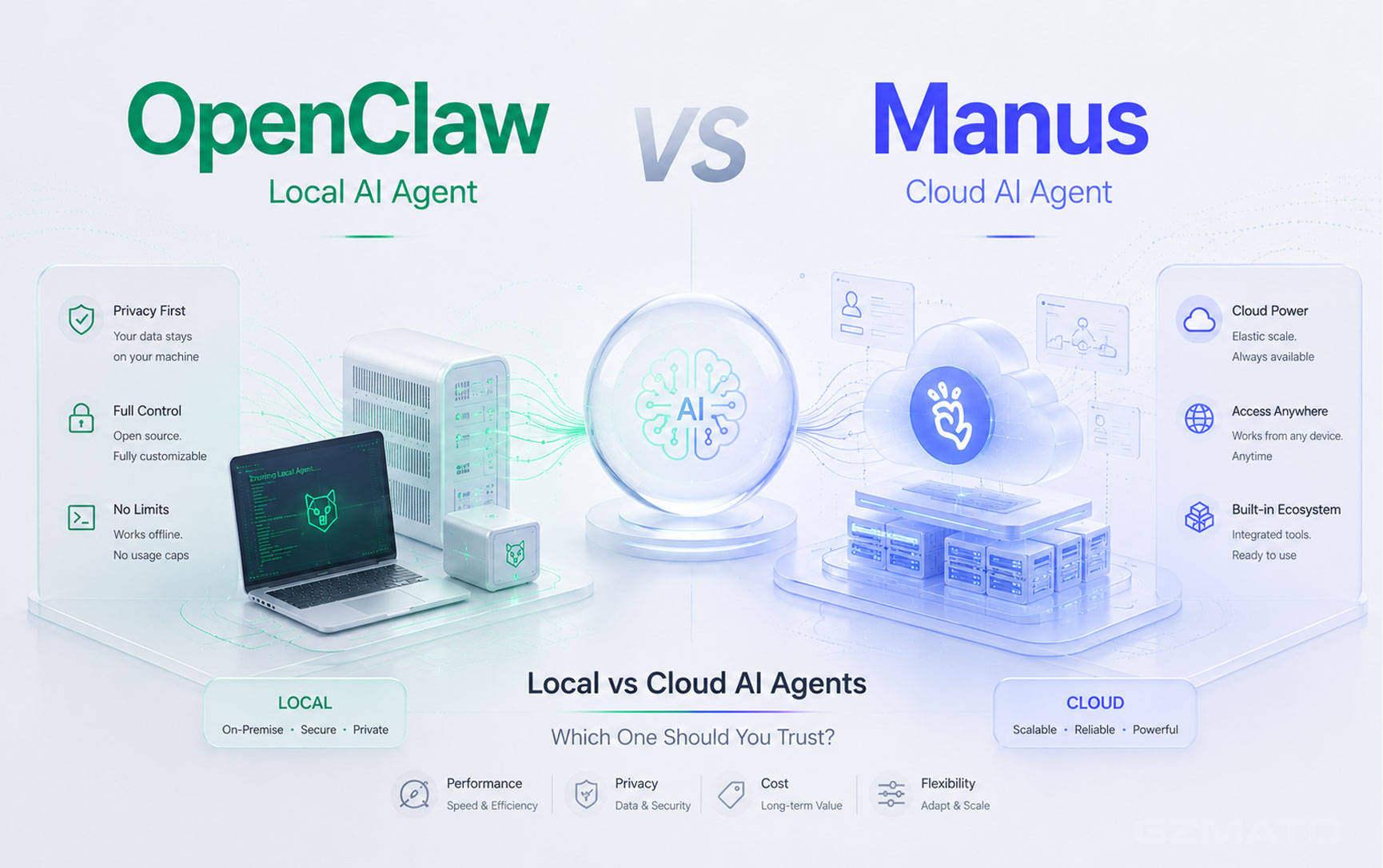
OpenClaw vs Manus: Two Philosophies of AI Agents
AI agents are evolving from chatbots that answer questions into autonomous systems that execute tasks. Instead of just telling you how to order food, an AI agent can actually order it for you.
But not all AI agents are built the same way. Two distinct philosophies have emerged: OpenClaw (an open-source agent you run on your own hardware) and Manus (a cloud-based assistant accessed through an app or chat). The choice between them comes down to a fundamental question: how much control are you willing to give up — and how much technical risk are you willing to take on?
What Is OpenClaw? The Open-Source AI Agent
OpenClaw is an open-source AI agent framework that runs on your own hardware. It was built by Austrian developer Peter Steinberger in November 2025 as a side project — originally called Clawdbot, then Moltbot, before settling on the name OpenClaw. Within weeks it became one of the fastest-growing open-source AI projects ever, reaching hundreds of thousands of GitHub stars.
In February 2026, Steinberger himself joined OpenAI to work on "next-generation personal agents." Importantly, OpenClaw the project did not become an OpenAI product — it moved into an independent foundation that OpenAI agreed to sponsor, and remains open-source under its existing license.
Core Capabilities
- Browser automation: Control any website, fill forms, click buttons, scrape data
- Local app control: Open applications, read files, execute commands (with your permission)
- Cross-platform messaging: Works with WhatsApp, Telegram, Discord, Slack, and even iMessage
- Task scheduling: Run automated workflows daily, hourly, or on any schedule
- Custom skills: Extend functionality through a modular skill system
Who Is It For?
OpenClaw is designed for developers, tech enthusiasts, and anyone who prioritizes privacy and control over convenience. You'll need to be comfortable with the command line, Docker, API keys, and configuration files — and, as the next section explains, with locking the whole thing down properly.
The OpenClaw Security Scandal: 200,000 Exposed Agents
OpenClaw's explosive growth came with a serious downside. Shortly before Steinberger's move to OpenAI, security researchers discovered that more than 200,000 OpenClaw instances were exposed on the open internet — running with default credentials, no authentication, and direct access to users' files, passwords, and API keys.
Security analysts at the time called this an "unacceptable cybersecurity risk." The default configuration that made OpenClaw so easy to get running in minutes — a server listening on every network interface with no login required — was the same configuration that left it wide open to anyone who knew where to look.
The upside: because OpenClaw is open-source and now backed by a foundation, security issues are visible and patchable by the community — unlike a closed cloud service where you have to simply trust the provider's internal practices.
What Is Manus? The 'Plug-and-Play' AI Assistant
Manus is a general-purpose AI agent, accessible via Telegram and a desktop app, that can browse the web, manage tasks, and execute multi-step workflows. Scan a QR code, and you're ready to go — no servers, no configuration, no technical knowledge required.
Manus was originally developed by Butterfly Effect, a startup founded in China and later based in Singapore. In April 2026, Meta announced a roughly $2 billion acquisition of Manus. However, the deal faced regulatory complexities, and by May 2026 reports emerged that Manus was exploring a buyback to unwind the transaction. As of publication, Manus's corporate ownership remains unsettled — readers should treat any "Manus is owned by X" claim as a moving target and check current reporting before relying on it.
Core Capabilities
- Pre-built task templates: Business analysis, technical development, marketing, content creation
- Asynchronous task execution: Start a task, close your device, get notified when it's complete
- Multimodal input: Voice messages, images, documents — all supported
- Multiple model tiers: A faster/lighter tier for simple tasks and a more powerful tier for complex reasoning
Who Is It For?
Manus targets everyday users who want AI assistance without technical complexity. If you've never used the command line and don't want to learn, Manus-style services are the obvious choice — the trade-off is that your data and tasks live on someone else's servers, under ownership that may change.
Side-by-Side Comparison
| Dimension | OpenClaw | Manus |
|---|---|---|
| Nature | Open-source, self-hosted, foundation-backed | Commercial, cloud-hosted |
| Data Location | Your own hardware | Provider's cloud servers |
| Deployment Difficulty | High (needs Docker, API keys, config — and security hardening) | Low (scan QR code, start chatting) |
| Price | Free + API costs (variable, can be significant) | $20-40/month fixed |
| Data Control | Complete user control, if configured correctly | Provider controls access and policy |
| Known Security Issues | 200,000+ instances found exposed with no authentication (Feb 2026) | No comparable mass-exposure incident reported |
| Best For | Developers and privacy-conscious users willing to secure their setup | General consumers who want convenience without setup |
The Security Red Line: What AI Agents Should NEVER Do
Regardless of which agent you choose, certain tasks should be permanently off-limits. These are not technical limitations — they're security principles.
| Domain | OpenClaw Can? | Manus Can? | Should You Allow? |
|---|---|---|---|
| View bank balance | Theoretically yes | No | NEVER |
| Execute money transfers | Theoretically yes | No | NEVER |
| Manage subscriptions | Theoretically yes | No | NEVER |
| Access SSH keys / passwords | Yes, if given path | No | NEVER |
| Edit sensitive documents | Yes, if given path | Via upload | Read-only only |
| Send work emails | Yes | Yes | Non-sensitive only |
| Manage calendar | Yes | Yes | Safe |
| Summarize emails | Yes | Yes | Safe |
How to Deploy OpenClaw Safely
If you choose to self-host OpenClaw, here are practical security measures you should implement — especially given the 200,000-instance exposure incident covered earlier.
1. Never Expose the Default Setup to the Internet
2. File System Permissions
Read-only paths: ~/Documents/readonly/
Read-write paths: ~/Desktop/ai-workspace/
Forbidden paths: ~/Documents/banking/, ~/.ssh/, ~/Library/Keychains/
3. Browser Access Control
- Allow: Office websites (email, CRM, project management tools)
- Block: Banking, payment, and cryptocurrency sites
- Use a dedicated browser profile for AI agent operations
4. System API Restrictions
- Disable dangerous shell commands (rm -rf, chmod, sudo)
- Maintain an allowlist of permitted commands
- Log all command executions for audit
5. Monitor API Usage
OpenClaw users have reported large surprise bills when agents run uncontrolled loops. Set spending limits on your API keys and enable usage alerts.
A Note on Cloud-Based AI Agents
Manus-style cloud agents are convenient precisely because the heavy lifting happens on someone else's servers. That convenience comes with a general trade-off worth keeping in mind for any cloud-based AI agent, not just Manus.
Data Ownership Questions
When you upload a document or start a task on a cloud AI agent, your data resides on the provider's servers. Corporate ownership of AI companies can also change quickly — as the ongoing uncertainty around the Meta-Manus transaction shows — and with it, the policies governing your data.
General Best Practices for Any Cloud AI Agent
- Treat sensitive documents (financial statements, contracts, ID documents, trade secrets) the same way you would treat a public forum post — assume they could be seen or retained
- Calendar management, scheduling, content generation, and research on public topics are generally low-risk uses
- Read the provider's data retention and training policy before relying on it for anything work-related
Key Takeaways
| # | Key Takeaway |
|---|---|
| 1 | Local vs cloud is the fundamental choice — OpenClaw keeps data on your hardware but requires technical skill and security hardening; Manus offers convenience but gives up data control. |
| 2 | OpenClaw remains open-source despite its creator joining OpenAI — the project moved to an independent, OpenAI-sponsored foundation rather than becoming a closed product. |
| 3 | 200,000+ OpenClaw instances were found exposed online — with no authentication and access to files, passwords, and API keys. Never run the default setup on a public network. |
| 4 | Manus's corporate ownership is unsettled — Meta's acquisition has faced regulatory complexities and a possible unwind. Check current ownership before trusting it with sensitive data. |
| 5 | Never delegate banking or password tasks to AI agents — this is a hard security boundary. No exceptions. |
| 6 | Sensitive documents should be read-only only — agents can summarize and search, but should never modify them. |
| 7 | Monitor usage costs — OpenClaw's API bills can spiral into thousands per month; set spending limits. Manus's fixed subscription is predictable but less flexible. |
| 8 | Start small, then expand — test your AI agent with low-risk tasks before granting broader permissions. |
- CNBC, TechCrunch, Silicon Republic — OpenClaw creator Peter Steinberger joining OpenAI, foundation structure
- Threatroad / security researchers — 200,000+ exposed OpenClaw instances, default credential risk
- OpenClawHQ — OpenClaw project history and open-source foundation status
- TechRadar, AI Magazine — Meta's acquisition of Manus
- Tracxn, The Business Times — Manus acquisition complexities and potential buyback
- Wikipedia — Manus (AI agent) origin and Butterfly Effect background
Privacy Screens | USB-C Security Keys | Encrypted Drives | Secure Chargers | VPN Routers | Privacy Accessories
Special Offer: Use code TECH2026 for a discount on your first order!
Shop Privacy and Security at Gzmato
- OpenClaw
- Manus
- AI agent
- local AI
- cloud AI
- AI security
- AI privacy
- self-hosted AI