iOS Privacy: Instagram and Facebook can track anything you do on any website in their in-app browser

The iOS Instagram and Facebook app render all third party links and ads within their app using a custom in-app browser. This causes various risks for the user, with the host app being able to track every single interaction with external websites, from all form inputs like passwords and addresses, to every single tap.
What does Instagram do?
- Links to external websites are rendered inside the Instagram app, instead of using the built-in Safari.
- This allows Instagram to monitor everything happening on external websites, without the consent from the user, nor the website provider.
- The Instagram app injects their tracking code into every website shown, including when clicking on ads, enabling them monitor all user interactions, like every button & link tapped, text selections, screenshots, as well as any form inputs, like passwords, addresses and credit card numbers.
Why is this a big deal?
- Apple actively works against this kind of cross-host tracking:
- As of iOS 14.5 App Tracking Transparency puts the user in control: Apps need to get the user’s permission before tracking their data across apps owned by other companies.
- Safari already blocks third party cookies by default
- Google Chrome is soon phasing out third party cookies
- Firefox just announced Total Cookie Protection by default to prevent any cross-page tracking
- Some ISPs used to inject their own tracking/ad code into all websites, however they could only do it for unencrypted pages. With the rise of HTTPs by default, this isn’t an option any more. The approach the Instagram & Facebook app uses here works for any website, no matter if it’s encrypted or not.
Instagram is purposely working around the App Tracking Transparency permission system, which was designed to prevent this exact type of data collection. After its introduction, Meta announced:
Apple’s simple iPhone alert is costing Facebook $10 billion a year
Facebook complained that Apple’s App Tracking Transparency favors companies like Google because App Tracking Transparency “carves out browsers from the tracking prompts Apple requires for apps.”
Websites you visit on iOS don’t trigger tracking prompts because the anti-tracking features are built in.
With 1 Billion active Instagram users, the amount of data Instagram can collect by injecting the tracking code into every third party website opened from the Instagram & Facebook app is a staggering amount.
With web browsers and iOS adding more and more privacy controls into the user’s hands, it becomes clear why Instagram is interested in monitoring all web traffic of external websites.
Facebook bombarded its users with messages begging them to turn tracking back on. It threatened an antitrust suit against Apple. It got small businesses to defend user-tracking, claiming that when a giant corporation spies on billions of people, that’s a form of small business development.
– EFF - Facebook Says Apple is Too Powerful. They’re Right.
FAQs for non-tech readers
- Can Instagram/Facebook read everything I do online? No! Instagram is only able to read and watch your online activities when you open a link or ad from within their apps.
- Does Facebook actually steal my passwords, address and credit card numbers? No! I didn’t prove the exact data Instagram is tracking, but wanted to showcase the kind of data they could get without you knowing. As shown in the past, if it’s possible for a company to get access to data for free, without asking the user for permission, they will track it.
- How can I protect myself? For full details scroll down to the end of the article. Summary: Whenever you open a link from Instagram (or Facebook or Messenger), make sure to click the dots in the corner to open the page in Safari instead.
- Is Instagram doing this on purpose? I can’t say how the decisions were made internally. All I can say is that building your own in-app browser takes a non-trivial time to program and maintain, significantly more than just using the privacy and user-friendly alternative that’s already been built into the iPhone for the past 7 years.
Meta Pixel
The external JavaScript file the Instagram app injects (connect.facebook.net/en_US/pcm.js) is the Meta Pixel, as well as some code to build a bridge to communicate with the host app. This is not just a pixel/image, but actual JavaScript code that gets executed:
The Meta Pixel is a snippet of JavaScript code that allows you to track visitor activity on your website. It works by loading a small library of functions which you can use whenever a site visitor takes an action that you want to track […]
The Meta Pixel can collect the following data:
- […]
- Button Click Data – Includes any buttons clicked by site visitors, the labels of those buttons and any pages visited as a result of the button clicks.
- Form Field Names – Includes website field names like email, address, quantity, etc., for when you purchase a product or service. We don’t capture field values unless you include them as part of Advanced Matching or optional values.
– developers.facebook.com/docs/meta-pixel (June 2022)
"The Meta Pixel allows you to track visitor activity on your website" - This is the problem: It’s perfectly okay for a website provider to decide to implement the Meta pixel to track visitor activity. However in this case, the website operator did not consent to having the Meta Pixel installed. On top of that, the website provider doesn’t even have a way to opt-out.
Disclaimer
I don’t have a list of precise data Instagram sends back home. I do have proof that the Instagram and Facebook app actively run JavaScript commands to inject an additional JS SDK without the user’s consent, as well as tracking the user’s text selections. If Instagram is doing this already, they could also inject any other JS code. The Instagram app itself is well protected against human-in-the-middle attacks, and only by modifying the Android binary to remove certificate pinning and running it in a simulator, I was able to inspect some of its web traffic.
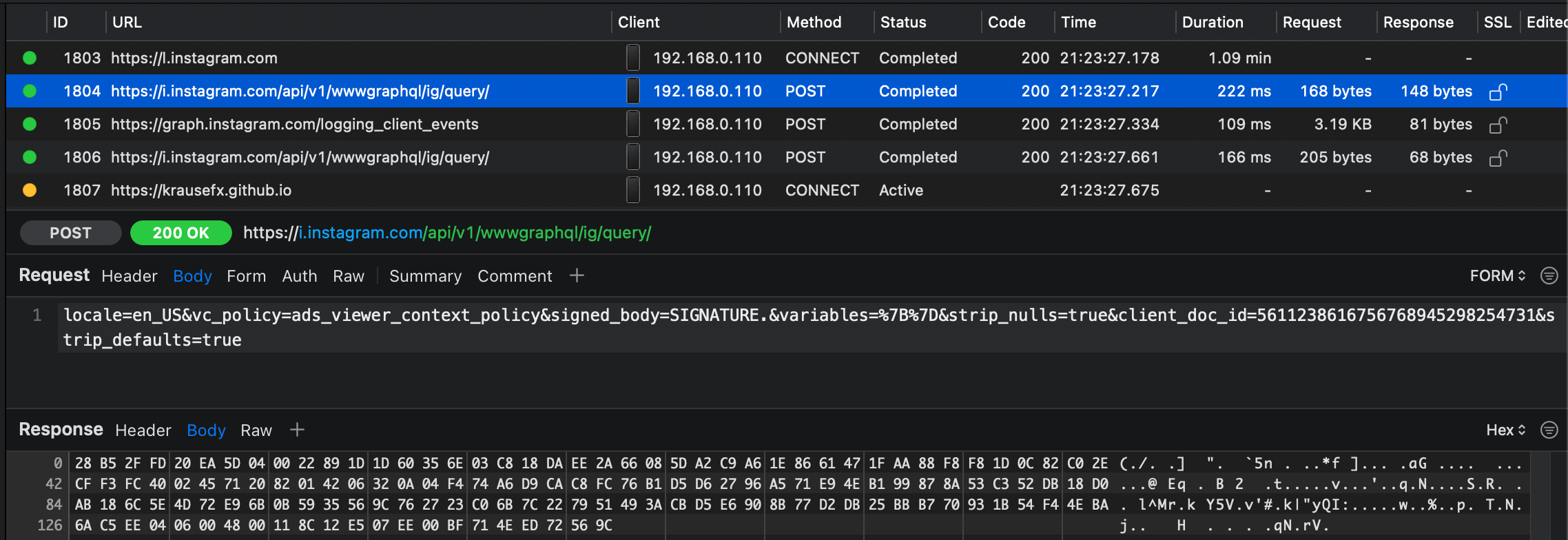
Even then, most of the actual data had another layer of encryption/compression. It is clear that they really don’t want you to investigate what kind of data is sent back to the API. I have decided not to spend more time on this.
Overall the goal of this project wasn’t to get a precise list of data that is sent back, but to highlight the privacy & security issues that are caused by the use of in-app browsers, as well as to prove that apps like Instagram are already exploiting this loophole.
To summarize the risks and disadvantages of having in-app browsers:
- Privacy & Analytics: The host app can track literally everything happening on the website, every tap, input, scrolling behavior, which content gets copy & pasted, as well as data shown like online purchases
- Stealing of user credentials, physical addresses, API keys, etc.
- Ads & Referrals: The host app can inject advertisements into the website, or replace the ads API key to steal revenue from the host app, or replace all URLs to include your referral code (this happened before)
- Security: Browsers spent years optimizing the security UX of the web, like showing the HTTPs encryption status, warning the user about sketchy or unencrypted websites, and more
- Injecting additional JavaScript code onto a third party website can cause issues and glitches, potentially breaking the website
- The user’s browser extensions & content blockers aren’t available
- Deep linking doesn’t work well in most cases
- Often no easy way to share a link via other platforms (e.g. via Email, AirDrop, etc.)
Instagram’s in-app browser supports auto-fill of your address and payment information. However there is no legit reason for this to exist in the first place, with all of this already built into the operating system, or the web browser itself.
Testing various Meta’s apps
Instagram iOS

Messenger iOS

Facebook iOS

Instagram Android
WhatsApp is opening iOS Safari by default, therefore no issues.
How it works
To my knowledge, there is no good way to monitor all JavaScript commands that get executed by the host iOS app (would love to hear if there is a better way).
I created a new, plain HTML file, with some JS code to override some of the document. methods:
document.getElementById = function(a, b) {
    appendCommand('document.getElementById("' + a + '")')
    return originalGetElementById.apply(this, arguments);
}
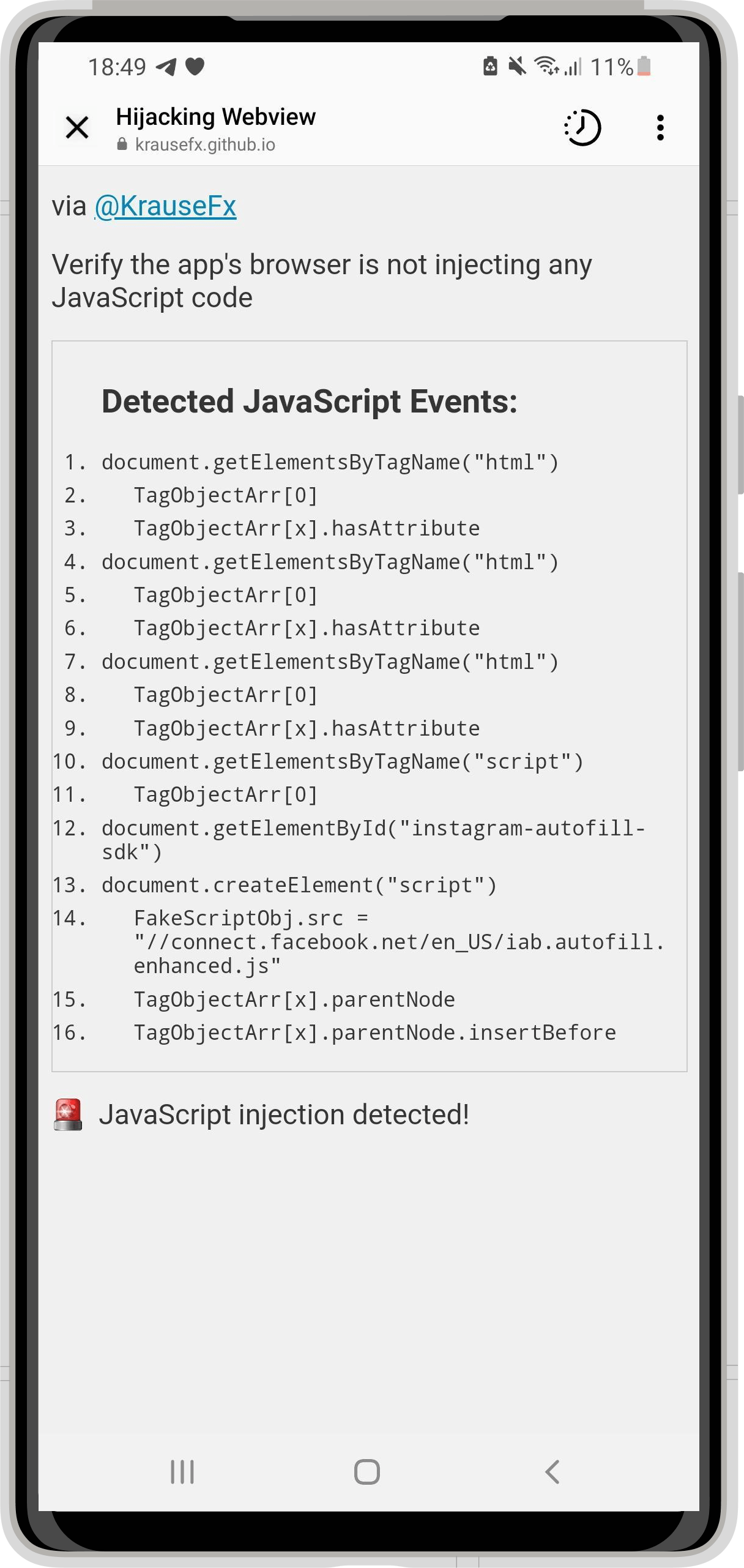
Opening that HTML file from the iOS Instagram app yielded the following:

Comparing this to what happens when using a normal browser, or in this case, Telegram, which uses the recommended SFSafariViewController:

As you can see, a regular browser, or SFSafariViewController doesn’t run any JS code. SFSafariViewController is a great way for app developers to show third party web content to the user, without them leaving your app, while still preserving the privacy and comfort for the user.
Technical Details
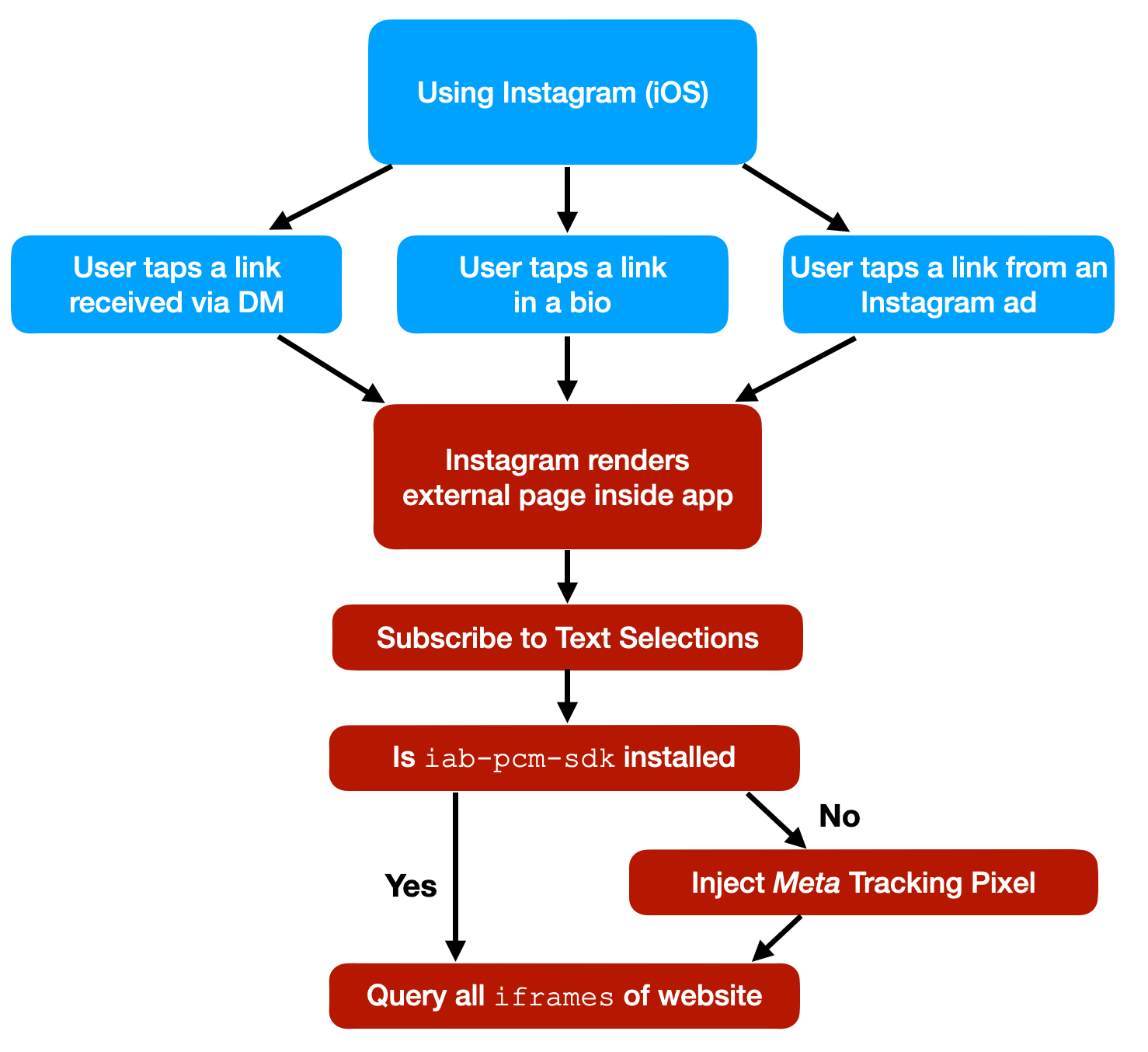
- Instagram adds a new event listener, to get details about every time the user selects any text on the website. This, in combination with listening to screenshots, gives Instagram full insight over what specific piece of information was selected & shared
- The Instagram app checks if there is an element with the ID
iab-pcm-sdk: surprisingly I found very little information about this online. Basically it seems to be a cross-platform tracking SDK provided by IAB Tech Lab, however I don’t know enough about the relationship between Instagram and IAB Tech Lab (e.g. this tweet) - If no element with the ID
iab-pcm-sdkwas found, Instagram creates a newscriptelement, sets its source tohttps://connect.facebook.net/en_US/pcm.js, which is the source code for the Meta tracking pixel - It then finds the first
scriptelement on your website to insert the Meta Pixel right before, injecting the Meta Pixel onto your website - Instagram also queries for
iframeson your website, however I couldn’t find any indication of what they’re doing with it
How to protect yourself as a user?
Escape the in-app-webview
Most in-app browsers have a way to open the currently rendered website in Safari. As soon as you land on that screen, just use that option to escape it. If that button isn’t available, you will have to copy & paste the URL to open the link in the browser of your choice.
Use the web version
Most social networks, including Instagram and Facebook, offer a decent mobile-web version, offering a similar feature set. You can use https://instagram.com without issues in iOS Safari.
How to protect yourself as a website provider?
Until Instagram resolves this issue (if ever), you can quite easily trick the Instagram and Facebook app to believe the tracking code is already installed. Just add the following to your HTML code:
<span id="iab-pcm-sdk"></span>
<span id="iab-autofill-sdk"></span>
Additionally, to prevent Instagram from tracking the user’s text selections on your website:
const originalEventListener = document.addEventListener
document.addEventListener = function(a, b) {
    if (b.toString().indexOf("messageHandlers.fb_getSelection") > -1) {
        return null;
    }
    return originalEventListener.apply(this, arguments);
}
This will not solve the actual problem of Instagram running JavaScript code against your website, but at least no additional JS scripts will be injected, as well as less data being tracked.
It’s also easy for an app to detect if the current browser is the Instagram/Facebook app by checking the user agent, however I couldn’t find a good way to pop out of the in-app browser automatically to open Safari instead. If you know a solution, I’d love to know.
Proposals
For Apple
Apple is doing a fantastic job building their platform with the user’s privacy in mind. One of the 4 privacy principles:
User Transparency and Control: Making sure that users know what data is shared and how it is used, and that they can exercise control over it.
– Apple Privacy PDF (April 2021)
At the moment of writing, there is no AppStore Review Rule that prohibits companies from building their own in-app browser to track the user, read their inputs, and inject additional ads to third party websites. However Apple is clearly recommending that to use SFSafariViewController:
Avoid using a web view to build a web browser. Using a web view to let people briefly access a website without leaving the context of your app is fine, but Safari is the primary way people browse the web. Attempting to replicate the functionality of Safari in your app is unnecessary and discouraged.
– Apple Human Interface Guidelines (June 2022)
If your app lets users view websites from anywhere on the Internet, use the
SFSafariViewControllerclass. If your app customizes, interacts with, or controls the display of web content, use theWKWebViewclass.
– Apple SFSafariViewController docs (June 2022)
Introducing App-Bound Domains
App-Bound Domains is an excellent new WebKit feature making it possible for developers to offer a safer in-app browsing experience when using WKWebView. As an app developer, you can define which domains your app can access, and all web requests will be restricted to them. To disable the protection, a user would have to explicitly disable it in the iOS settings app.
App-Bound Domains went live with iOS 14 (~1.5 years ago), however it’s only an opt-in option for developers, meaning the vast majority of iOS apps don’t make use of this feature.
If the developers of SocialApp want a better user privacy experience they have two paths forward:
- Use
SafariViewControllerinstead ofWKWebViewfor in-app browsing.SafariViewControllerprotects user data from SocialApp by loading pages outside of SocialApp’s process space. SocialApp can guarantee it is giving its users the best available user privacy experience while using SafariViewController.- Opt-in to App-Bound Domains. The additional
WKWebViewrestrictions from App-Bound Domains ensure that SocialApp is not able to track users using the APIs outlined above.
I highlighted the "want a better user privacy experience" part, as this is the missing piece: App-Bound Domains should be a requirement for all iOS apps, since the social media apps are the ones injecting the tracking code.
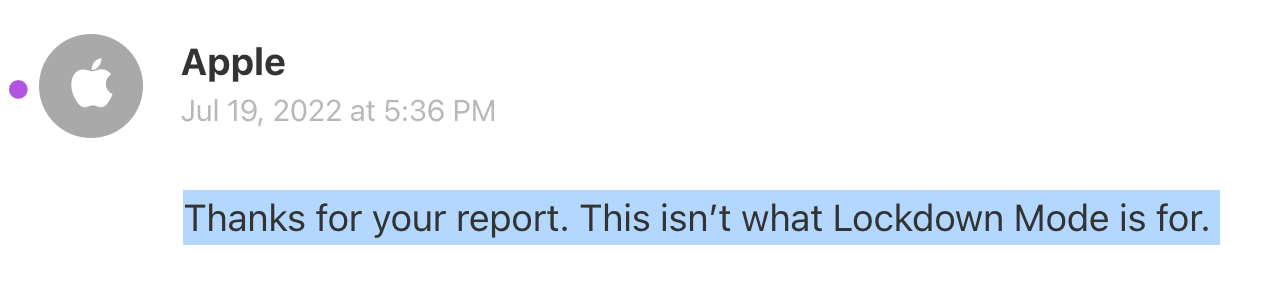
In July 2022 Apple introduced the Lockdown Mode to better protect people who are at high risk. Unfortunately the iOS Lockdown Mode doesn’t change the way in-app web views work. I have filed a radar with Apple: rdar://10735684, for which Apple has responded with “This isn’t what Lockdown Mode is for”
A few immediate steps for Apple to take:
Update the App Review Rules to require the use of SFSafariViewController or App-Bound Domains when displaying any third party websites.
- There should be only a few exception (e.g. browser apps), that require two extra steps:
- Request an extra entitlement to ensure it’s a valid use-case
- Have the user confirm the extra permission
- First-party websites/content can still be displayed using the
WKWebViewclass, as they are often used for UI elements, or the app actually modifying their first party content (e.g. auto-dismissing of their own cookie banners)
I’ve also submitted a radar (rdar://38109139) to Apple as part of my past blog post.
For Meta
Do what Meta is already doing with WhatsApp: Stop modifying third party websites, and use Safari or SFSafariViewController for all third party websites. It’s what’s best for the user, and the right thing to do.
I’ve disclosed this issue with Meta through their Bug Bounty Program, where within a few hours they confirmed they were able to reproduce the “issue”, however I haven’t heard back anything else within the last 9 weeks, besides asking me to wait longer until they have a full report. Since there hasn’t been any responses on my follow-up questions, nor did they stop injecting tracking code into external websites, I’ve decided to go public with this information (after giving them another 2 weeks heads-up)
Source - krausefx.com