Huawei MateBook Fold S: A Foldable PC With a Screen on the Back
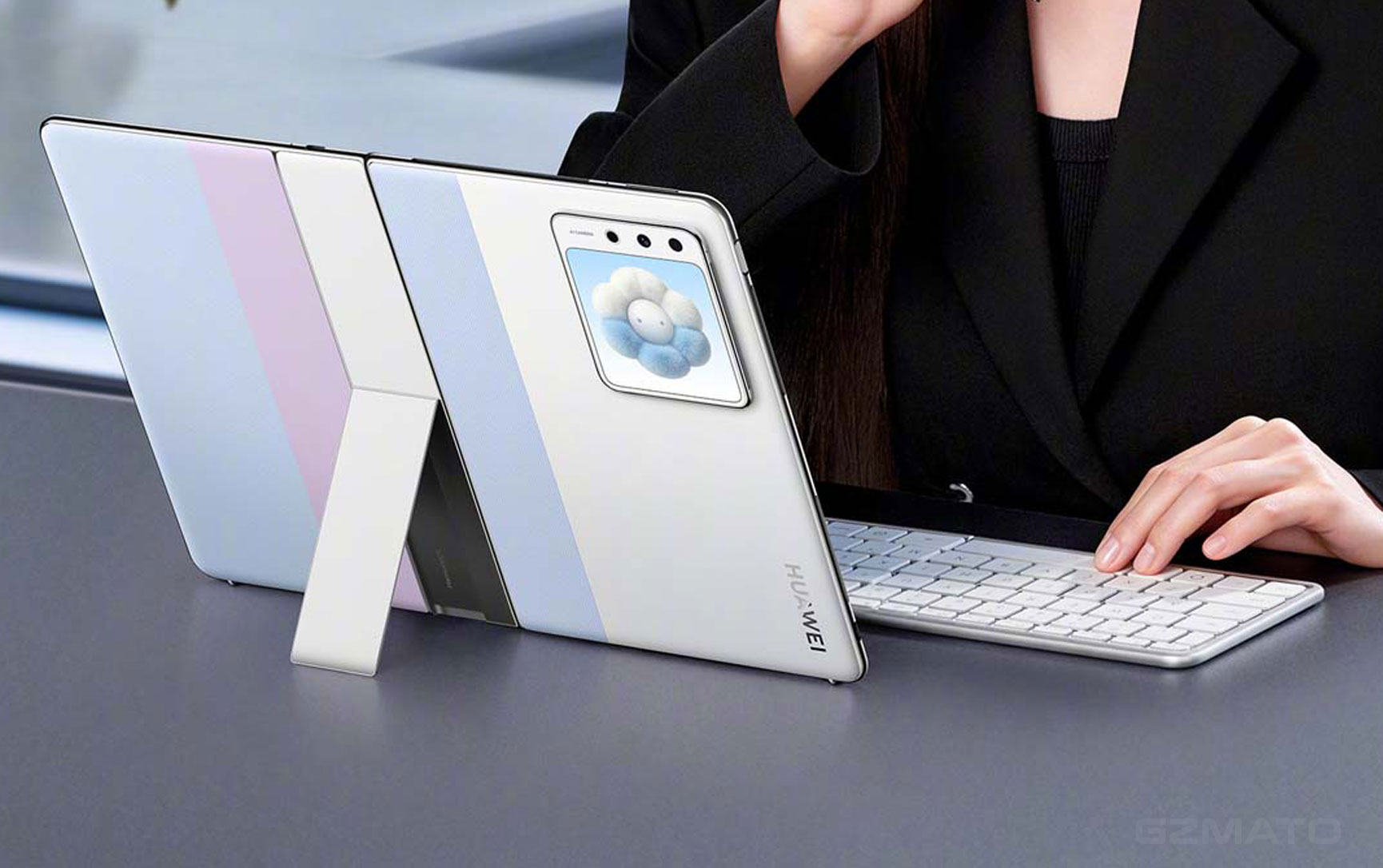
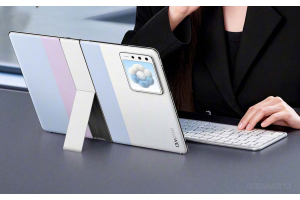
November 14, 2026 — Huawei has opened pre-orders for its second foldable PC, the MateBook Fold S. The pitch is straightforward: a 14.7-inch screen that folds down to roughly the size of a paperback book, weighing around 649 grams [citation:4][citation:7]. But the detail that has drawn the most attention is not the fold or the weight. It is the small screen embedded in the outer lid.
Huawei calls it the “Live 小方屏” (Live Small Square Screen). When the laptop is closed, it shows the time, notifications, calendar entries, and allows lightweight interactions without opening the main display [citation:1][citation:8]. It is, in essence, the external screen of a foldable phone, transplanted onto a foldable PC.
What You Get: 14.7 Inches, 649g, and a Back Screen
The MateBook Fold S sits below the existing MateBook Fold Ultimate in Huawei’s lineup. Where the Ultimate unfolds to 18 inches and weighs 1.16kg for the body alone, the Fold S targets a different use case: something you can actually carry without thinking about it [citation:2][citation:10].
| Spec | MateBook Fold S | MateBook Fold Ultimate |
|---|---|---|
| Unfolded Screen | 14.7 inches | 18 inches |
| Folded Size | ~10.2–10.7 inches | 13 inches |
| Body Weight | ~649g | ~1.16kg |
| Processor | Kirin X9 series | Kirin X90 Plus |
| OS | HarmonyOS 6.1 | HarmonyOS 6.1 |
| Back Screen | Yes (Live Small Square Screen) | No |
| Storage Tiers | 16+256 / 16+512 / 24+512 / 32+1TB | 32+1TB / 32+2TB |
The weight figure is the headline hardware achievement. Roughly 649 grams for a 14.7-inch foldable computer puts it in the same territory as a large tablet, not a traditional laptop [citation:4]. The keyboard is a separate foldable accessory, and the full package includes a sleeve and, on the top tier, a stylus [citation:1].
The Fold S comes in three colors: Cloud Sea Blue, Sky White, and Phantom Black. The Cloud Sea Blue is the standout, using a two-tone design with a textured finish that reads more “fashion accessory” than “corporate machine” [citation:1][citation:7]. Notably, the base 16GB+256GB configuration is not available in Cloud Sea Blue—that color starts at a higher tier.
The Debate: Is the Back Screen Useful or a Gimmick?
The back screen is the most divisive element of the Fold S. The case for it is straightforward: when a foldable laptop is closed, it becomes a dead slab. You cannot see notifications, check your calendar, or glance at a message without unfolding the entire device. The Live Small Square Screen solves that by giving you a glanceable surface when the laptop is shut [citation:11].
The case against it is equally straightforward. A foldable PC’s core advantage is portability. Adding a second screen adds cost, complexity, and another surface that can be scratched or damaged in a bag. As one critic put it: “The real pain point of foldable computers is ‘too heavy to carry,’ not ‘I can’t see information when it’s closed’” [citation:5].
There is also the question of implementation. Early reports suggest the back screen may use a magnetic attachment, which would make it an accessory rather than an integrated component [citation:5][citation:6]. If that is the case, it introduces a new workflow: attach the screen, detach it, store it safely, remember to bring it. That is not a seamless experience.
Huawei vs. Apple: Two Different Folds
The contrast with Apple’s foldable strategy is instructive. Apple’s iPhone Duo folds a phone into a tablet. It has been plagued by “Crackgate,” a supplier material defect that causes the inner screen to crack at the hinge [citation:1]. The lesson from Apple’s experience is that foldable hardware is hard, and the hinge is the most fragile part.
Huawei’s approach is different. It is not folding a phone. It is folding a laptop, and it has already shipped one generation (the Fold Ultimate). The Fold S is a refinement in the opposite direction: smaller, lighter, and with a new interaction surface. Huawei is betting that the foldable PC is a category worth investing in, not just a one-off showcase.
| Dimension | Apple (iPhone Duo) | Huawei (MateBook Fold S) |
|---|---|---|
| What Folds | A phone into a tablet | A laptop into a book-sized device |
| Core Problem | Hinge durability, screen cracking | Weight, portability, use-case clarity |
| Back Screen? | No (outer screen is the phone) | Yes (Live Small Square Screen) |
| Positioning | Premium phone, first generation | Portable productivity, second generation |
Who Should Consider This (and Who Shouldn't)
| Your Situation | Recommendation |
|---|---|
| You want a large screen you can carry everywhere | It is worth a look. A 14.7-inch display at ~649g is genuinely portable in a way that traditional laptops are not. The HarmonyOS ecosystem adds value if you already use Huawei devices. |
| You need Windows compatibility | Be cautious. The Fold S runs HarmonyOS, not Windows. If your workflow depends on Windows-only software, this is not the device for you. Virtualization exists but adds friction. |
| You are sensitive to price | Wait for reviews. The Fold Ultimate starts above 20,000 RMB. Even if the Fold S is cheaper, it will still be a premium purchase. The back screen adds cost that may not justify itself for your use case. |
| You want a foldable as your primary computer | Think carefully. Foldable PCs are still a young category. The keyboard is an accessory, the software ecosystem is evolving, and the durability of the fold over years of use is unproven. |
| You are a Huawei ecosystem user | Strong fit. Multi-device collaboration, file sharing, and the M-Pencil support are genuine advantages if you already live in HarmonyOS. |
Key Takeaways
| # | What You Need to Know |
|---|---|
| 1 | Huawei opened pre-orders for the MateBook Fold S on Nov 14. It is the company’s second foldable PC, positioned below the 18-inch Fold Ultimate. |
| 2 | The body weighs roughly 649g. That is a massive reduction from the 1.16kg Fold Ultimate and puts it in tablet territory for portability [citation:4]. |
| 3 | The back screen is the defining feature. It shows notifications, time, and calendar entries when the laptop is closed, solving a real limitation of foldable PCs [citation:1][citation:8]. |
| 4 | Critics question the value. The back screen adds cost and potential fragility to a device whose main advantage is being light. Whether it is genuinely useful or just a differentiator is unresolved [citation:5]. |
| 5 | It runs HarmonyOS, not Windows. This is a productivity device for the Huawei ecosystem, not a general-purpose Windows laptop. |
| 6 | Storage starts at 16GB+256GB. The top 32GB+1TB tier includes a stylus. All tiers come bundled with a keyboard and sleeve [citation:1]. |
| 7 | Huawei is investing in foldable PCs as a category. Unlike Apple’s troubled first-generation foldable phone, Huawei has already shipped one foldable PC and is now expanding the lineup. |
- CHINAZ — Huawei MateBook Fold S storage configurations revealed: 16+256GB base, 32GB+1TB top tier (Nov 14, 2026)
- Huawei Official — MateBook Fold Ultimate specifications (for comparison)
- NGA — MateBook Fold S measured weight: 649g body, 190g keyboard (Nov 9, 2026)
- NetEase / Hot Tech — Huawei adds back screen to foldable PC: useful or gimmick? (Nov 9, 2026)
- Zhihu — MateBook Fold S unboxing: small square screen and Cloud Sea Blue (Nov 9, 2026)
- PConline — Yu Chengdong teases MateBook Fold S with back screen design (Nov 10, 2026)
MacBook | Windows Laptops | Tablets | Keyboards | Styluses | Sleeves
Special Offer: Use code TECH2026 for a discount on your first order!
Shop Laptops at GzmatoTell us what you use your laptop for and how often you carry it, and we can help you weigh the options. Chat with us or open a request.
- Huawei MateBook Fold S
- foldable PC
- back screen laptop
- Huawei foldable computer
- HarmonyOS PC
- Kirin X9
- Gzmato